How to practise English with ChatGPT: prompts to copy, and what voice chat won't correct
By the SpeakWisely team · Published · 7 min read

To practise English with ChatGPT, give it a role and a correction rule first, talk to it in voice mode, then read the transcript and ask for corrections at the end. Without those instructions it behaves like a conversation partner, not a teacher, so many slips may pass without comment. It is useful for speaking time and for grammar and vocabulary suggestions. It is much less reliable as a judge of exactly what you said or how you pronounced it.
This guide gives you prompts to copy, explains what voice chat does and does not correct, and shows a simple way to check its feedback. For the wider question of what AI feedback can tell you, read how to learn to speak English with AI. The prompts below were written by the SpeakWisely team. Answers will differ from one conversation to the next.
How do you practise English conversation with ChatGPT?
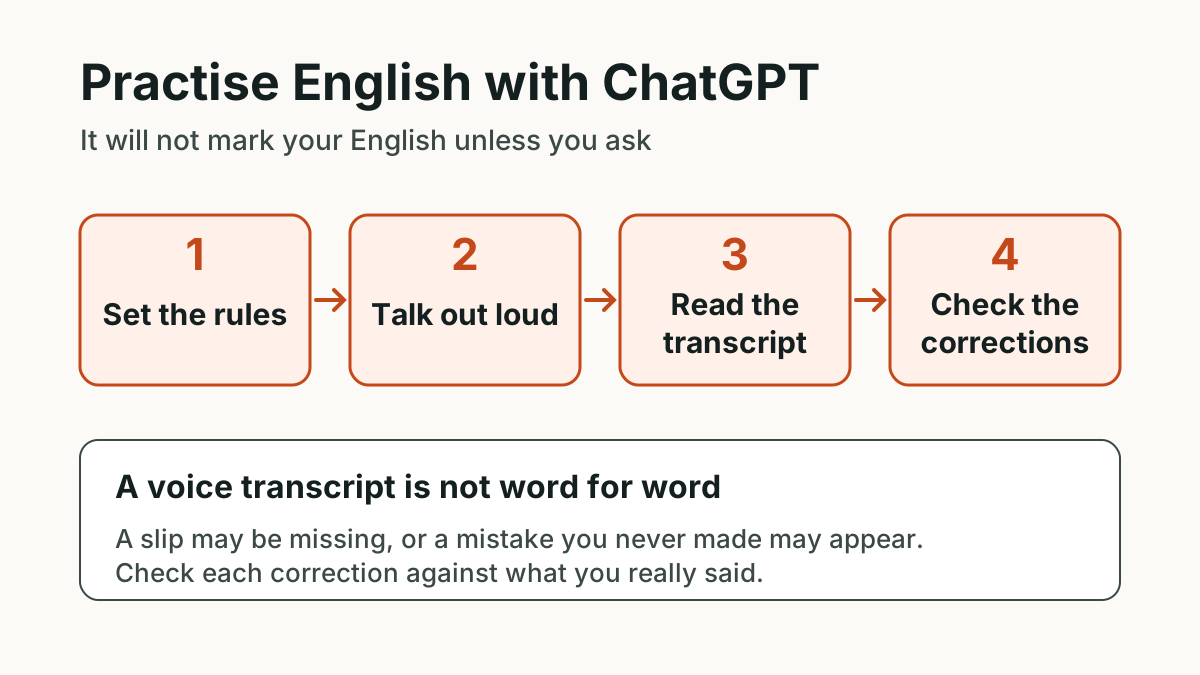
ChatGPT's App Store listing mentions real-time voice conversation and practising a new language. Menus change, so look for the soundwave icon the listing mentions. Then follow four steps:
- Set the rules. Type or paste one prompt from the next section as your first message.
- Talk for five to ten minutes. Start voice from the same chat. If it does not seem to follow your rules, read the main instruction aloud. That is extra speaking practice anyway.
- Read the transcript. OpenAI says a transcript is added to the chat when a voice conversation ends. Read what it thinks you said before you ask for any feedback.
- Ask for corrections, then retry. Paste the review prompt, choose one correction and answer the same question again out loud.
Which ChatGPT prompts work for English speaking practice?
A good prompt names four things: who ChatGPT is, your level, how long its replies should be and when it may correct you. Short replies matter most. If the assistant talks for a minute, you are doing listening practice, not speaking practice. Change the details in square brackets.
- Conversation
- You are my English conversation partner. My level is [intermediate] and I live in [Pune]. Talk with me about [my work]. Keep each reply under two sentences and always end with one question. Do not correct me while we talk. I will ask for corrections at the end.
- Interview
- Act as a polite interviewer for a [customer support] job in India. Ask one question at a time and wait for my full answer. Ask a follow-up about something I actually said. Do not give feedback until I say "finish the interview".
- Work call
- Play a client who is unhappy about a delayed delivery. Speak in short, natural sentences. Interrupt me once or twice, the way a real client might, so I can practise staying calm and clear.
- Longer turns
- Ask me one question about daily life. Then stay silent until I say "done", even if I pause. I want to practise speaking for one full minute without help.
- Beginner
- I am a beginner and my first language is [Hindi]. Use simple English and short sentences. Ask me easy questions about my family, food and daily routine. If I get stuck, give me the first three words of an answer, not the full answer.
- IELTS style
- Give me a practice topic in the style of an IELTS Speaking Part 2 task. Write your own topic, and do not claim that it comes from a real test. Give me one minute to prepare, then ask me to speak for up to two minutes.
After the conversation, paste this review prompt. It asks for a small number of corrections and asks ChatGPT to quote your words, so you can check each one.
- Review
- Using the transcript of this conversation, list up to five corrections to my English. For each one, quote my exact words from the transcript, give a natural version and explain the reason in one line. If you are unsure whether the transcript is accurate, say so. Do not comment on my accent.
We hold corrections until the end because stopping every sentence breaks your flow. If you are a beginner and prefer quick help, ask for one small correction after each answer instead.
What does ChatGPT voice chat correct, and what does it not?
The short answer is that it corrects what you ask it to correct, based on what it understood, and that may not be exactly what you said. A conversation partner tends to respond to your meaning. If you say "Yesterday I go to office", it will probably understand and carry on talking about your day. When you ask, it can suggest fixes for tenses, articles and word order, as long as the transcript shows the slip, and offer more natural wording at your level.
What you should not rely on
- A word-for-word record. OpenAI's Voice help says voice transcripts are not verbatim and may not exactly match what was said. A slip may be missing, and a mistake you never made may appear.
- Pronunciation scoring. OpenAI's 2026 release notes say ChatGPT can show how a word is pronounced, with audio and a phonetic breakdown, which is useful for learning a word you are unsure of. We found nothing from OpenAI describing a scored assessment of your own speech, so treat any comment on your sounds as a rough impression, not a measurement.
- Exact fluency numbers. Do not assume a figure for your pauses, fillers or speed is measured unless the tool shows how it got that figure. Our guide to how to stop saying "um" shows how to count these yourself with a phone recording.
- A real exam score. An estimate from a chatbot is not an IELTS result, and its answer may vary if you ask twice.
- Accent judgements. An Indian accent is not an error. See our pronunciation guide for Indian speakers for the sounds that affect clarity.
How can you tell whether a correction is right?
Use a two-minute check. If you have a second phone or a laptop, record the session on it and play back the moment ChatGPT quotes. If you do not, say the quoted answer again into your voice recorder, without looking at the transcript, and see whether the same slip comes out.
- You said it, and the correction makes sense: keep it. Say the better version aloud three times.
- The transcript is wrong: ignore the correction. The problem may be the microphone, the noise or a misheard word. If it keeps detecting the wrong language, OpenAI's help says you can set your preferred language under Settings, Voice, Language.
- The correction only changes your style: keep it only if it sounds like something you would actually say.
- You are still unsure: check the rule in our guide to common grammar mistakes in spoken English, or ask a teacher or a strong English speaker you trust.
Is ChatGPT voice free, and are there limits?
The ChatGPT app is listed as free with in-app purchases on India's App Store. OpenAI's Voice help says Free users get limited access and that limits may change, while paid plans get more. It also says a conversation can end when you reach a usage limit or the maximum session length, or when a long conversation reaches its context limit. Check the current page rather than planning around a fixed number of minutes.
Before you use voice regularly, read the same help page and your Data Controls settings to see how voice data is stored and used. In role-plays, use an invented company or client rather than private details.
When is ChatGPT not enough for speaking practice?
ChatGPT suits open conversation on any topic. It is a weaker fit if you want a fixed test format, one consistent way of scoring you, or a record of your repeated mistakes. Our comparison of the best AI apps for English speaking practice shows where each tool fits, including where others do better than ours. It cannot replace people either, so use it as a warm-up for real conversations, alongside our guide to practising English speaking alone.
Want feedback that quotes the words the speech recogniser heard, with your pauses and fillers measured from their timing? Answer one question out loud in SpeakWisely. You can check the transcript against the feedback yourself.
Start practising freeCommon questions about practising English with ChatGPT
Can I learn English with ChatGPT for free?
Does ChatGPT correct my English automatically in voice mode?
Can ChatGPT check my pronunciation?
Can ChatGPT give me an IELTS speaking band?
Want the same idea on another assistant? Read our guide to English speaking practice with Gemini Live, and use our English conversation practice questions when you run out of topics.
Your recording is used only to transcribe your answer, then deleted within 15 minutes. We keep your transcript and results, never the audio.
Sources
Keep reading
 Spoken English8 min read
How to learn to speak English with AI: what AI feedback can and can't tell you
AI is a patient practice partner that can measure your pauses and quote your mistakes. It cannot give you an official score or replace real conversations. Here is how to use it well.
 Spoken English7 min read
English speaking practice with Gemini Live: prompts to say aloud and what to check
Gemini Live lets you talk, interrupt and show it what you see. Here are prompts to say aloud, exercises that use the camera, and how to review the transcript honestly.
 Spoken English7 min read
Best AI apps for English speaking practice: a fair comparison of six
There is no single best AI English speaking app. We compare six from their own pages, say who each suits, and show where the others beat ours. SpeakWisely publishes this post.
 Spoken English7 min read
How to practise speaking English alone, with nothing but your phone
No partner needed: a six-step, 15-minute routine for speaking English alone at home, with 30 topics to talk about and a simple way to measure progress.